
This year has seen unprecedented changes in the workplace. Remote working has exploded in an extraordinary manner due to COVID-19 restrictions and stay-at-home orders.
This has made it more difficult for companies to celebrate milestones and special events with employees. Team bonding has become more difficult. As the end of the year, and other special holidays approach, you may be wondering how to throw a virtual company party and recapture some of the bonding, fun, and relaxation of traditional company parties.
Here are 12 ways you can turn your office party into a fun, exciting Virtual Covid Party
1. Pick a Theme
A theme is vital for any party, and it’s especially important to a virtual party. Choose a theme and encourage team members to dress up and have some fun virtually. Here are some ways you can incorporate a theme into your party:
- Choose a theme on Thanks and decorate with banners and widgets to match your theme.
- Encourage employees to dress up. Offer rewards for costumes: best dressed, most authentic, goofiest, etc.
- Choose a color theme. Black and white make for a classic theme.
- Have employees vote on their favorite decade using Thanks polls. Then choose that decade for your theme. Incorporate popular TV clips, iconic images, and other pop culture into your theme.
- Incorporate international holiday’s into your party. Have team members from around the world share their holiday traditions. This can be done in a virtual meeting.
2. Video Invitations
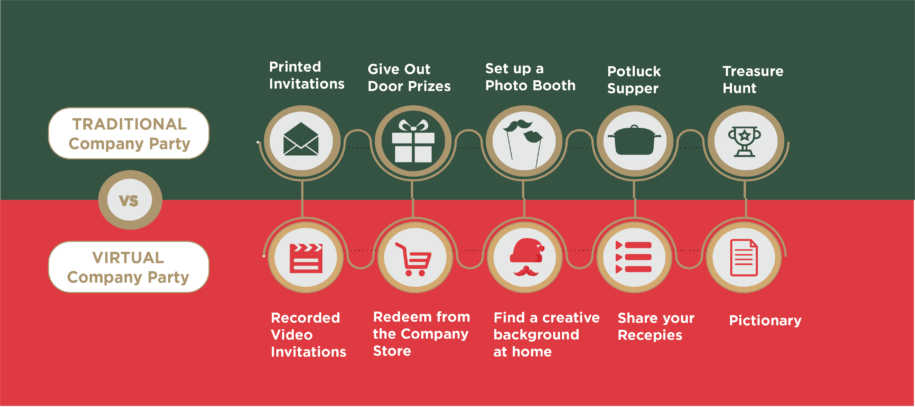
Have some fun by recording invitations and holiday greetings from managers. Make the videos fun, exciting and allow employees to get to know you better. Send out the video invites a couple of weeks before the party. You can also use the Announcement feature on Thanks to upload an image invitation.
Keep things fun by posting additional videos as the party draws closer. Allow employees to post videos and host a contest for the most festive video greeting.
3. Quizzes
Use the quizzes function of Thanks to host department-wide or company-wide quizzes. Use quizzes for the basis of getting-to-know you games you’ll play at your party. The Thanks Idea feature can be used for employees to submit their party ideas, themes, and donation preferences. Use the Announcement feature to announce the winners and share pictures of the winners.
4. Party in A Box
Send out a party box to each employee. You can include a trigger that makes celebratory sounds when the box is opened, confetti, and theme-based fun. Include theme-based content that your employees will need for any games you are doing, some individually wrapped food, and a giftcard or gift. Make sure to include enough samples of the food for family to join them if you are doing a virtual party that includes family members. Encourage team members to wait to open the box until everyone has joined the party.
5. Give Out Door Prizes
Just because employees are gathering virtually doesn’t mean you can’t give out door prizes. Have photos of the prizes you are giving out ready to share with employees. Or, you can add your door prizes to your company store on Thanks and have employees go in to redeem them. Hand out points throughout the party for participation and contests and employees can go in and redeem the prize they really want.
6. Photo Booth
Photo booths are one of the most classic party activities of all time. Just because your party is virtual doesn’t mean you can’t provide a virtual photo booth to your employees. Purchase or find a creative background and share it with employees. Many conferencing technologies allow for backgrounds to be added. Then, have employees pose.
Or, take advantage of many of the fun photo filters available and have employees pose and submit their photos. Pick a theme or options and have employees play with the filters and add their photos. Employees can add elf ears, change their age, add mustaches, or use a myriad of other filters. Employees can vote for their favorite photos on Thanks in the poll feature. Winners can be uploaded to the Photo Gallery by admins and winners awarded points for redemption later.

7. Recipe Potluck
Your employees may be spread far and wide, but consider turning the traditional potluck into a recipe share. Choose a theme, such as a dessert or a holiday-themed food, and encourage employees to share their favorite recipe.
Employees can cook the food, or record themselves making it, and share the recipe. You’ll end up with a lot of fun and tasty foods. Depending on the size of your company or department, they can either show off their recipe during the company party or email a video/photo that can be emailed out by the organizer.
If you want to go the extra mile, consider turning the recipes into a company cookbook and giving it to employees a few weeks later. It will remind them of the fun they had and provide them with a great keepsake.
8. Festive Games
No party is complete without fun games. Fortunately, there are many fun games you can still play virtually with your employees. Consider these fun ideas:
- Theme based Charades
- Pictonary
- Trivia: movie trivia, music trivia, a book-based trivia
- Three truths and a lie
- Photo of your life: Employees share a photo that show something about them and explains it. This can be a photo of their pet, coffee mug, favorite tv show, kids, view from their window, anything!
9. Entertainment
Consider bringing in some entertainment to your party. You could have a motivational speaker pre-record a talk for your employees. Check out these entertainment ideas:
- Motivational speaker
- Magician
- Mind reading
- Musicians
- Comedian
- Key influencer in a specific niche
10. Give Back to The Community
Use Thanks polls to find out what social issues your employees care the most about. Then, choose a cause that’s popular across the company and hold a drive. Provide a company match for any donations made during the month. Employees can record time they volunteer. Celebrate the funds raised at the party and the hours donated.
Or, invite someone from the organization to join your party virtually and present them with the check of donations and company match. You can even play a video about the organization to show employees the good that they do.
11. Gift Exchanges Made Fun
- Gift Auction: send monopoly money before, or hand it out virtually and have everyone bid on the gift. Be sure to set an upper spending limit before! Reward the employee who “sells” their gift for the highest amount with a prize.
- Mug Exchange: Have employees fill a mug with treats or gifts and wrap it. The party organizer can assign the order of the gift exchange (randomly or by another order) and start an email round-robin. Allow each item to be swapped so many times before it settles to the final owner.
- Theme ideas: Book theme, Ornament exchange, Movie exchange, Ugly sweater exchange, Chocolate-based, etc.
- Secret Santa: Collect the names of employees who want to participate and a short list of desired gifts under a certain dollar amount. Then, draw names. The secret santa send the gift to the recipient. Have them put the return address of the company on the package to keep their name a secret. Then, open gifts vía a video meeting and let the fun begin!
12. ECards
Follow up with an ecard through Thanks. Send out holiday cards and comment on how much fun you had getting to know them better. Be sure to take notes so you can make the card personalized, especially for remote or newer employees you may not know as well.
Employees can also send each other ecards through Thanks to make the holidays more memorable. Use the gift feature to send your earned reward points along with your wishes and make your colleague feel special.
About Thanks
Thanks is a leading provider of a recognition-based platform that increases communication, builds teamwork, and makes recognition a part of company culture. Fast, easy and simple Thanks makes it easy to bring data-driven employee recognition to your entire organization. O.C. Tanner purchased the Thanks platform in 2019 to fulfill the recognition needs of smaller businesses.
Thanks customers benefit from the same decades of research in employee motivation and company culture that O.C. Tanner enterprise clients enjoy, but in a product that is geared for fast, easy and simple deployment. Whether you’re starting a recognition program or improving and expanding on what you already have, Thanks has everything you need to engage your people with effective, scalable recognition. Thanks is a subsidiary of OC Tanner.